






 Cihat Murat Yüksel
17 min read
Cihat Murat Yüksel
17 min read
Advertising on ChatGPT: Ads Manager and Your First Campaign
ChatGPT ads appear below the answer with a “Sponsored” label and don’t change the answer; Ads Manager is open to businesses in Türkiye. This guide covers the order we follow, from opening an account to the first 30 days.Pro
Contents 12 sections
launched as a test in the US on February 9, 2026. In May, the self-serve Ads Manager and cost-per-click bidding arrived in the US; by the end of August, the platform had expanded to more than 40 countries and reached a $1 billion annualized revenue run rate. In mid-September, Türkiye was added to OpenAI’s self-serve access list. So the question is no longer “will it come?” but “how do we set up the first campaign?”
We wrote this guide for marketing teams that know Google Ads but have never advertised on ChatGPT. Every date and rule comes from OpenAI’s own Help Center and announcements. We deliberately left out price estimates from third-party blogs, because OpenAI does not publish a price list; bids and relevance set the cost.
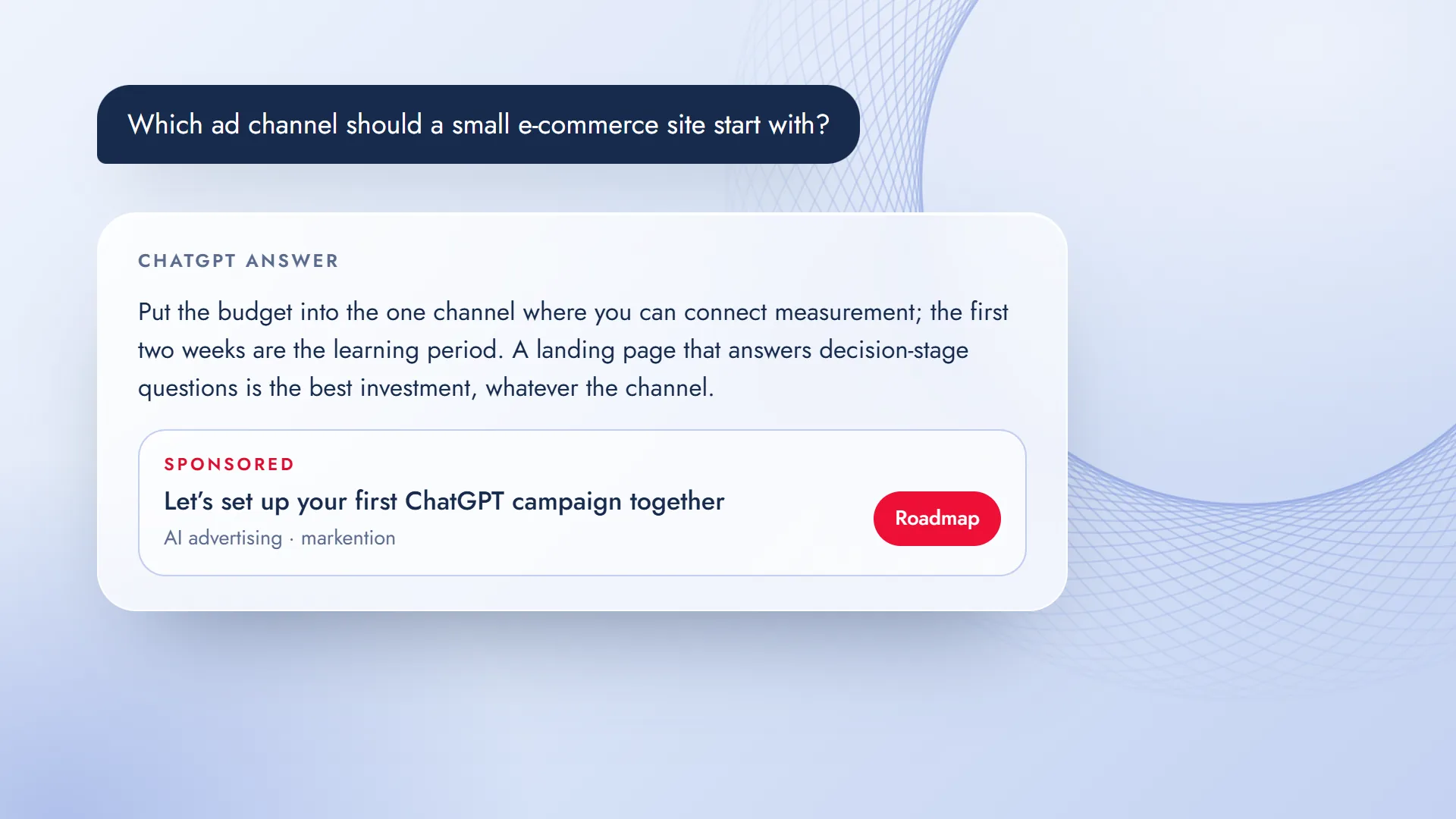
The ad appears below the answer with a “Sponsored” label; it does not affect the answer, and your conversations are not shared with advertisers.
What are ChatGPT ads, and where do they appear?
Once ChatGPT finishes its answer, it can add an ad unit below it. The unit is visually separate from the answer and carries a “Sponsored” label. OpenAI’s clearest rule is this: ads run on a system separate from the chat model, and advertisers cannot shape, rank, or change the answer. Seeing an ad also does not mean OpenAI recommends that product.
For signed-in users, ads appear only on the Free and Go plans; people who use ChatGPT without signing in can also see ads suitable for all audiences. Free users can switch to an ad-free option by accepting lower usage limits. Where ads are not shown:
- Plus, Pro, Business, Enterprise, and Edu accounts
- Accounts identified as belonging to users under 18
- Temporary Chats, and the Atlas browser during the test
- Near sensitive topics such as personal health, mental health, and politics
When you set up a campaign, these limits describe your audience: users on the free tier who are researching something and are at the decision stage.
A short timeline
| Date | What happened | What it means for advertisers |
|---|---|---|
| February 9 | Testing began in the US on the Free and Go plans | A small group of advertisers, on CPM |
| May 5 | A beta self-serve Ads Manager rolling out gradually in the US, with CPC bidding, Pixel, and Conversions API; agencies such as Dentsu, Omnicom, Publicis, and WPP, and technology partners such as Adobe, Criteo, and StackAdapt | Advertisers in the US began opening accounts directly |
| August 18 | Ads expanded to 31 markets in Europe | Reach to users in Europe |
| August 31 | A $1 billion annualized revenue run rate in under 200 days; more than 40 countries; self-serve in India, Europe, the Middle East, and North Africa | Advertisers in these regions gained self-serve access; Türkiye was not yet on the list |
| Mid-September | Türkiye, the UAE, Saudi Arabia, and other countries in the region were added to the self-serve list | Businesses in Türkiye can open an Ads Manager account |
| September 16 | Sponsored Agents (testing in the US), the Ads Manager app, AI-assisted creative, and HubSpot and Shopify integrations | An ad can now turn into a conversation |
Can you advertise from Türkiye?
Yes. In the “Ads Manager availability” list in OpenAI’s Help Center, Türkiye has been among the countries where self-serve access is marked “Available” since mid-September. The requirements for opening an account: the legal entity that will advertise and be billed must be based in a listed country; identity and business verification must be complete (business verification can take up to 7 business days); your category must comply with the advertising policy; and you need a credit card that matches the account country. Country, currency, and time zone cannot be changed later, so choose them correctly when you open the account.
You open the account at ads.openai.com and are taken to Ads Manager after signing up; campaigns do not go live until verification and review are complete. OpenAI says new accounts can initially run ads only in their own country, and that other countries open up once verification is complete and a certain spend is reached in your home country. Spend is charged to the card afterward, when the billing threshold is reached or at the end of the month.
The steps to get started are short:
- Check the Türkiye row in the country list in the Help Center.
- Open an account at ads.openai.com with your legal entity details; choose the country, currency, and time zone correctly.
- Complete identity and business verification, and add a credit card that matches the account country.
- Read the advertising policy and confirm that your category is allowed under the non-US rules.
For large advertisers with more complex needs, OpenAI has an Ads Solutions team and sales support. Each advertiser should have its own account: an agency that manages several brands opens a separate account for each brand. If the account is set up from within ChatGPT, the agency cannot open it on the client’s behalf; the brand opens the account and invites the agency. We also recommend keeping the account with the brand and inviting the agency as a user. The list is updated often: checking its current version before a campaign is the first step for everyone, including us.
Your first campaign in Ads Manager: five steps
- Set up the account, verification, and paymentLegal entity, identity and business verification, and a credit card that matches the account country; country, currency, and time zone cannot be changed later.
- Define the campaign, objective, and budgetObjective: Impressions (CPM), Clicks (CPC), or Conversions (oCPC/oCPM); a daily or lifetime budget; the default bid strategy is to maximize results.
- Prepare the ad and the ad groupThe headline, description, image, and landing page go in the ad; the notes OpenAI calls “context hints” go in the ad group. Upload in bulk or create them one by one in the tool.
- Connect measurementPixel (on the relevant pages, including the landing page) or Conversions API; events such as orders, leads, and sign-ups should flow from day one.
- Launch, learn, adjustCopy and landing page fixes in the first two weeks, based on aggregated impression and click reports.
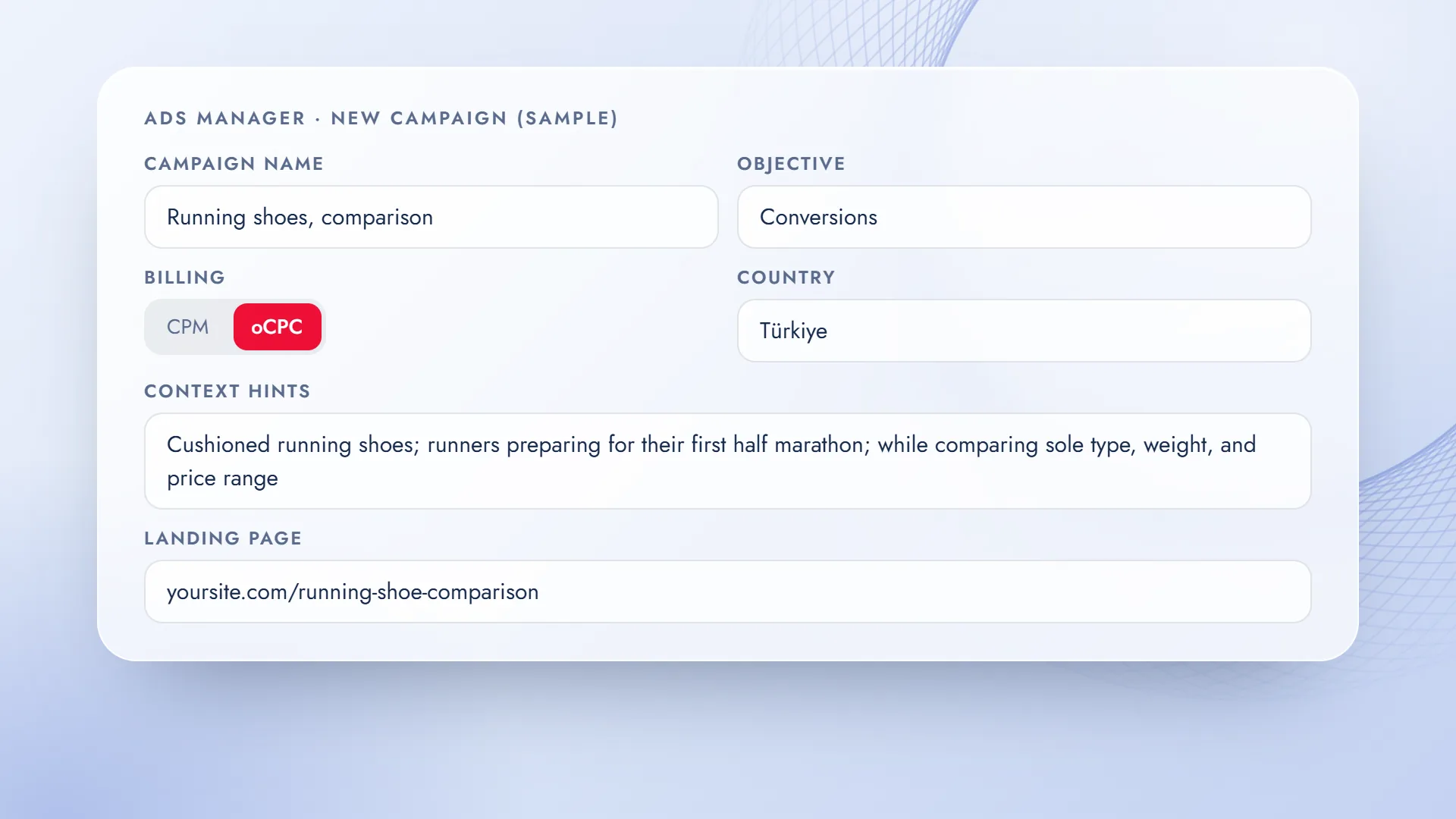
An example: take an e-commerce site that sells running shoes. The campaign name is “Running shoes — comparison,” the objective is Conversions, billing is per click (oCPC), and the country is Türkiye. There is no language setting in the campaign: the ad’s language is determined by location, the user’s language setting, and the language of the conversation. In the ad group, we write the context hint in the “what, who, when” order OpenAI recommends: “cushioned running shoes; runners preparing for their first half marathon; while comparing sole type, weight, and price range.” The landing page is not the home page but the page with the comparison table. For measurement, the Pixel is connected and the event is the order. If these five lines are right, the rest of the campaign is a matter of adjustments.
Targeting and ranking: context, not keywords
The first question from teams coming from Google Ads is usually “which keywords will we bid on?” ChatGPT has no such list. According to OpenAI, ad selection looks at signals such as the context and intent of the current conversation, the ad’s landing page, headline, and copy, the context hints the advertiser provides, and targeting choices. When several eligible ads are available, relevance and bid together determine the ranking.
If the user keeps ad personalization on, past conversations and memory can also be signals; personalized ads are initially not available in the European Economic Area and Switzerland. On the advertiser side, product feeds, platform and geographic targeting, and custom audiences are available; including a custom audience in a campaign or using a bid multiplier requires at least 25,000 matched users. The practical takeaway: a campaign is built not on a keyword list but on a landing page and ad copy that describe which question you want to appear in the answer to. This is exactly what we do in work; on the paid side, the same discipline pays off.
Bids and budget: CPM, CPC, or conversions
In the first phase of the pilot, there was only CPM; CPC was added in May, and according to OpenAI, as of August most campaigns run on CPC and outcome-based bid strategies. OpenAI’s reasoning is clear: ChatGPT conversations are decision-oriented, and in that setting a click is a meaningful sign that the ad worked.
Today, when you set up a campaign, you choose one of three objectives: Impressions (CPM), Clicks (CPC), and Conversions (oCPM/oCPC, billed per impression or per click and optimized for conversions; there is no pay-per-conversion option). There is no overall spend commitment; however, the daily budget has a minimum that depends on the currency (e.g., $25 or €15). Spend in a single day can reach twice the daily budget, while the seven-day total does not exceed seven times the daily budget.
| Model | What for | When |
|---|---|---|
| CPM (per thousand impressions) | Visibility, introducing a new category | The first week, when you want to gauge demand; brand awareness goals |
| CPC (per click) | Site traffic, landing page testing | While measurement is being set up; until conversion data builds up |
| Conversions (oCPC / oCPM) | Sales, forms, sign-ups | After Pixel or Conversions API is connected and enough results have built up |
OpenAI does not publish a public price list; cost is set in a relevance-weighted second-price auction. OpenAI’s own recommendation is to start CPC campaigns with a maximum bid of $3–$5. We don’t put the “X dollars per click” figures circulating online into campaign plans; our method is a small two-week test and reading the actual cost from our own account.
Measurement: Pixel, Conversions API, and what you won’t see
In May, OpenAI opened measurement based on Pixel and Conversions API; outcomes such as purchases, leads, and sign-ups can be tied to ads. What advertisers see is aggregated, non-identifying performance data: impressions, clicks, and the outcomes you connect. What you won’t see matters just as much: conversations, chat history, memory, names, email addresses, precise location, IP addresses, or sensitive information never go to advertisers. If a user messages you through an ad, you see only that message.
The Pixel is a small script placed in the <head> section of the relevant pages, including the landing page; it captures the ad click ID and reports events. Conversions API reports the same events from the server. Events are sent with the names OpenAI defines (e.g., order_created, lead_created, registration_completed); the value is written as an integer in the currency’s minor unit. Conversion reports also include one-day view-through and modeled conversions.
Copy the Pixel’s loader code and ID from Ads Manager; the lines below only show the format of the calls:
<!-- <head> section of the relevant pages, including the landing page -->
<script>
  oaiq("init", { pixelId: "YOUR_PIXEL_ID" });
</script>

<!-- when a lead form is submitted -->
<script>
  oaiq("measure", "lead_created", { type: "customer_action" });
</script>
An important detail under KVKK (Türkiye’s personal data protection law): the Pixel has a consent mode (oaiq("consent", false)); measurement data should not be sent before the visitor gives consent. On our own site, we tie measurement tags to cookie consent; the Pixel should follow the same rule.
Sponsored Agents and new tools
With the September 16, 2026 announcement, ads began turning into conversations. Sponsored Agents let a person who clicks an ad talk, inside ChatGPT, with a business agent that is clearly marked as sponsored: the user explains what matters to them, asks follow-up questions, and moves to your site when ready. This conversation is separate from ChatGPT’s independent answer. The Help Center describes the feature as a limited alpha: it is currently being tested only with select advertisers in the US, and early access applications are not being accepted.
The tools released the same day make the setup side of a campaign lighter: the Ads Manager app lets you create and analyze campaigns in natural language from within ChatGPT; there are copy and image suggestions based on the landing page; and there is optional copy customization, meaning the headline is adapted to the context of the conversation and automatically translated into the user’s language. Teams that use HubSpot can manage ads directly from the CRM; Shopify’s ChatGPT Ads app launched in the US and is coming to the international markets where the platform is available starting September 23. Buying options are growing too: an API has opened for advertisers, and ChatGPT ads are being piloted through Amazon DSP in the US.
Policy limits
Read the advertising policy before you set up the campaign; the rules differ for the US and for outside the US. Political ads are not accepted at all, and no ads are placed near sensitive topics such as personal health, mental health, and politics. Outside the US, which includes ads run from Türkiye, healthcare services (excluding health software) and legal services cannot be advertised. In financial services, categories such as deposits, credit cards, insurance, mortgages, and investments are open only to select advertisers approved by OpenAI; ads for personal loans, “buy now, pay later,” payment services, and crypto are prohibited. Ads for alcohol, tobacco, gambling, dating, and adult content are not accepted either; ads with mature content, such as age-restricted films or games, are shown only to eligible, signed-in users.
There is one more technical requirement: your landing page must be accessible to OpenAI’s ad bot (OAI-AdsBot). If robots.txt or a protection layer such as Cloudflare blocks the bot, the page cannot be reviewed. If an ad is rejected, Ads Manager shows the reason at the copy, image, or landing page level; the fix needs to be made at that level.
Ad copy: copy that answers the conversation
Since there is no keyword targeting, ad copy should read like a short answer to the question in the conversation. Below someone asking “Which e-commerce platform is best?”, “Sale of the year” won’t work; “A platform you can integrate in a week” will. The landing page should also continue the conversation: if the user is making a comparison, your page should open with a comparison table.
Two versions of copy for the same product: the search ad says “The biggest running shoe sale of the year, buy now”; the ChatGPT ad says “Comparison table by sole type: weight, cushioning, and price range side by side for runners preparing for their first half marathon.” The second one continues the conversation. When writing copy:
- Make the headline read like a short answer to the question in the conversation, not a slogan.
- Have the description state one concrete benefit; instead of unmeasurable adjectives like “best” or “leading,” use a table, a timeframe, or a scope.
- Write the context hint the way OpenAI recommends, as “what, who, when”: the product, who it is for, and the moment it helps; price range and service area can also be hints.
- Have the landing page open with the answer to the conversation, so users who click see the same conversation continue.
- Copying Google Ads copyA search ad answers a query, a ChatGPT ad answers a conversation; the tone and length are different.
- Leaving context hints emptyOpenAI uses the context the advertiser provides as a signal; leaving it empty weakens matching.
- Sending traffic to the home pageWithout a page that answers the question in the conversation, you get clicks but no results.
- Increasing the budget in the first weekScaling before measurement is in place is spending without learning.
- Treating GEO as a separate jobOrganic mentions and paid visibility share the same answer surface; both need to run under one plan.
A 30-day starter plan
- Week 1Account and measurement
Ads Manager account, identity and business verification, payment, Pixel or Conversions API; reading the advertising policy against the non-US rules.
- Week 2Two campaigns
One with the Clicks (CPC) objective to test the landing page; once measurement is in place, a second with the Conversions objective. Two versions of copy and one landing page in each.
- Week 3Review and adjust
Copy, context hint, and page fixes based on aggregated reports and conversion data.
- Week 4Decision
Actual cost per click and cost per conversion; scale up, or move to a combined plan with GEO.
Frequently asked questions
Which users see ChatGPT ads?
Signed-in users on the Free and Go plans; people who use ChatGPT without signing in can also see ads suitable for all audiences. There are no ads on Plus, Pro, Business, Enterprise, and Edu accounts, on accounts identified as under 18, or in Temporary Chats; Free users can switch to an ad-free option with lower usage limits.
Does my ad affect ChatGPT’s answer?
No. OpenAI runs ads on a system separate from the chat model; advertisers cannot shape, rank, or change the answer. The ad sits below the answer, in a separate, labeled unit.
Can a company in Türkiye use Ads Manager?
Yes. Türkiye has been on OpenAI’s self-serve availability list since mid-September. You need a legal entity based in a listed country, identity and business verification, a category that complies with the policy, and a credit card that matches the account country.
Is there a minimum budget, and how much does a click cost?
There is no overall spend commitment, but the daily budget has a minimum that depends on the currency (e.g., $25 or €15). OpenAI does not publish a price list; cost is set in a relevance-weighted auction, and OpenAI recommends starting CPC with a maximum bid of $3–$5. The most reliable way to learn the actual cost is a small two-week test.
Can I target keywords?
No. Matching is based on the context of the conversation, your ad copy, your landing page, and the context hints you provide; product feeds, geographic and platform targeting, and custom audiences are available.
Can I see users’ conversations?
No. Advertisers receive only aggregated impression, click, and connected conversion data. If a user messages you through an ad, you see only that message.
Are Sponsored Agents available in Türkiye?
No. They are currently being tested as a limited alpha only with select advertisers in the US, and early access applications are not being accepted. OpenAI is opening new markets gradually; this post’s last-updated date is the date this line was checked.
If we already do GEO, do we still need ads?
The two do different jobs on the same surface: GEO gets the brand cited as a source within the answer, while ads provide visibility below it. For decision-stage questions, planning both together gives the best results.
Questions & answers
0 commentsNo questions yet; you can ask the first one.